► Building Better Web Apps with Kreo: A Hands-On Guide
Step 1: Setting Up Your Account - Start the 7-day free trial at https://www.kreo.net. Choose a plan that matches your team’s load: Lite ($35), Plus ($70),...
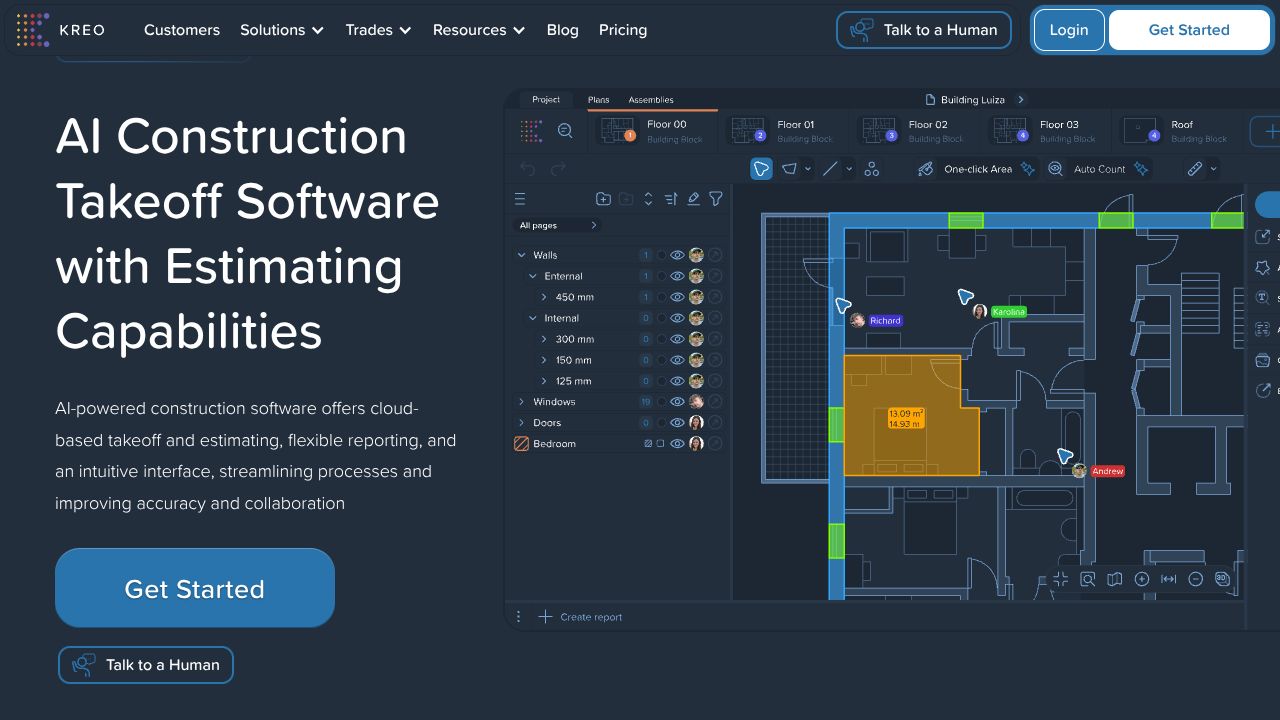
[ Device Preview - Kreo ]
════════════════ DEVICE SPECIFICATION ════════════════
Beat the Bid-Day Crunch with AI Takeoff That Doesn’t Break Your Flow
Picture this: bid due at 5 p.m., the architect just dropped a 200-page PDF set, and your spreadsheet has more hidden formulas than a leaky legacy codebase. In my 15 years, I’ve watched teams burn days on manual takeoffs, only to discover a missed window type at the eleventh hour. While Autodesk Revit and Archicad shine for BIM authoring and model-based quantities, and Trimble SysQue fuels MEP fabrication detail, Kreo is better suited for the “now” problem: fast, accurate takeoffs from PDFs, CAD, and images with AI you can trust. Think 10x faster bids, fewer errors, and a single source of truth your precon team can actually live in.
Step 1: Setting Up Your Account
- ►Start the 7-day free trial at https://www.kreo.net. Choose a plan that matches your team’s load: Lite ($35), Plus ($70), Pro ($175), or Enterprise for scale/security needs. If you’re coordinating multiple estimators, start with Pro for full collaboration and reporting.
- ►Create your workspace and invite users. Assign roles early—Estimator, Reviewer, Admin—to avoid overwrites and preserve audit trails.
- ►Upload drawings: PDFs, CAD, or images. Name files with revision tags (e.g., A-101_R2) so change tracking stays clean.
- ►Calibrate scale: either auto-detect or manually set known dimensions. Pro tip: validate against two dimensions on different sheets to catch DPI issues.
- ►Connect Excel workflows: enable import/export so your team can round-trip BOQs without copy-paste drama.
Step 2: Core Features You Need to Know
- ►Auto Measure for lines and areas
- ►Example: Trace the building perimeter once—Kreo auto-detects the slab perimeter and computes formwork and concrete volumes when tied to an assembly.
- ►One-Click Area
- ►Example: Select a room boundary on a plan; Kreo fills it instantly. Use for floor finishes, paint, or roofing membranes. Apply finish categories via templates for consistent coding.
- ►Auto Count for symbols
- ►Example: Count all 900x2100 doors or recessed downlights across an entire set. Teach Kreo a symbol once; it finds every match—even across revisions—then surfaces deltas.
- ►BOQ and Cost Plan Generation
- ►Attach items from your assemblies database (e.g., “120mm Block Wall with plaster both sides”). Kreo converts takeoffs into structured BOQs and rolls up a cost plan you can scenario-test (Value Engineering A vs. B).
- ►Templates and Assemblies
- ►Import your pricing libraries from Excel, map codes, and save as reusable templates. This is where you build your internal “Category Indexes” of work items so every project speaks the same language.
- ►Cloud Collaboration
- ►Unlimited projects/storage means you can run parallel bids. Comment on sheets, assign issues, and lock completed takeoffs to prevent accidental edits.
Step 3: Pro Tips for Developer Tools Professionals
- ►Treat takeoff as data, not drawings: enforce naming conventions, layer tags, and unit standards. Your “Tool Profiles” should live as templates with strict field validation.
- ►Scenario-first estimating: clone a project and swap assemblies (e.g., metal deck vs. precast) to produce “Comparison Tables” in minutes—no re-measurement.
- ►Verify AI with sampling: spot-check 5–10% of Auto Count results per sheet; set a review status so QA isn’t tribal knowledge.
- ►Version diffs that matter: re-upload revised PDFs under the same project; Kreo highlights changes and updates counts. Export change reports to Excel for leadership sign-off.
- ►Speed keys: learn shortcuts for measure/zoom/switch tools; it adds up when you’re on sheet 147 at 4:45 p.m.
Common Mistakes to Avoid
- ►Skipping scale calibration on every sheet: not all PDFs inherit scale reliably. Validate on two axes before measuring.
- ►Mixing revisions in one folder: always suffix files with R1/R2 and archive old sets. Lock completed sheets.
- ►Blind trust in AI: Auto Count is powerful, but always review edge cases—rotated symbols, low-res scans, and overlapping hatches.
How It Compares to Alternatives
- ►Autodesk Revit: Excels at model-based quantities when the BIM is mature. But building a model just to bid a fast-turn RFP is overkill. Kreo is better for 2D PDF/CAD takeoffs, faster onboarding, and lower cost of ownership.
- ►Archicad: Strong architectural workflows and schedules tied to clean models. If the model is incomplete or you’re handed scanned PDFs, Kreo’s AI automations win on speed and error reduction.
- ►Trimble SysQue: Great for MEP detailing and fabrication-ready content inside Revit. Kreo isn’t for spool sheets; it’s for preconstruction takeoffs, BOQs, and collaborative cost plans.
Conclusion: Is Kreo Right for You?
If you’re a quantity surveyor, estimator, or contractor juggling bids and alternates, Kreo’s AI takeoff plus BOQ pipeline is the pragmatic choice. It slots into your stack without forcing a model, handles messy PDFs, and gives you scenario-ready cost plans fast. Start with the free trial, build your assemblies library, and standardize templates—those “New Additions” to your process will pay back on your very first bid cycle. Others won’t tell you this: speed only matters if you can trust the numbers. With Kreo, you get both.